

If you run a WordPress website, protecting it from hackers is not optional anymore, it’s a must in 2025. Hackers can steal your data, mess up your site, or even take full control.
If you are using WordPress and don’t know much about security, don’t worry.
In this article, we will talk about Wordfence Security and see if it’s the right tool to protect your site in 2025.
As a WordPress developer and security consultant with over 14 years of hands-on experience, I’ve worked with thousands of websites.
Over the years, I’ve tested many tools, and Wordfence stands out as one of the best WordPress security plugins available today.
If you’re wondering “Is Wordfence enough?” or “Can Wordfence remove malware?”, keep reading.
How to Choose a Security Plugin for WordPress?
If you search “WordPress security plugins,” you will see many options. So, how do you pick the right one?
Here are a few things to look for:
- Does it have a firewall scan?
- Can it scan a website for malware?
- Does it offer website security monitoring?
- Is there login protection like 2FA?
- Is it a free security plugin for WordPress, or do you have to pay?
- Does it slow down your site?
Before choosing the WordPress security plugin, you have to consider the above option. You have to choose something that keeps your site safe without making it slow or hard to use.
What is Wordfence?
Wordfence is one of the most popular WordPress security plugins. It protects your website from hackers, malware, and other threats.
It has both a free version and a premium version.
Many people trust Wordfence because it is easy to install, simple to use, and gives strong protection.
You don’t have to be an expert to use it.
What Is Wordfence Used For?
Wordfence is used to protect WordPress websites from common online threats.
Whether you start a WordPress blog or a business website, Wordfence gives you strong tools to check and block anything suspicious.
Core uses of Wordfence:
- Malware scanning
- Real-time firewall protection
- Login security with 2FA
- Blocking suspicious traffic
- Monitoring live traffic
Whether you’re a beginner or a pro, Wordfence is very user-friendly.
One of my clients’ dental clinics (earning $500K/year) was hacked. Wordfence helped me detect and remove the malware and prevent future attacks.
How Does Wordfence Work?
Wordfence works like a bodyguard for your website. It stands at the front door and checks everything that tries to get in.
Here’s how it works step-by-step:
- Firewall Protection: It blocks bad traffic before it reaches your site. This helps stop hackers and bots.
- Malware Scanner: It scans all your files for viruses or suspicious code. It checks plugins, themes, and core WordPress files.
- Login Security: It protects your login page. Wordfence 2FA (two-factor authentication) makes it hard for hackers to break in.
- Live Traffic Monitoring: You can see who is visiting your site and what they are doing.
This plugin acts like a security guard, virus scanner, and alarm system, all in one.
What are the Benefits of Wordfence?
Here are some simple benefits of using Wordfence Security:
- Easy to install and set up
- Real-time WordPress security scan
- Blocks fake traffic and brute force attacks
- Sends email alerts if something is wrong
- Gives a report after every scan
- Protects the login page with 2FA
- Works well even if you don’t know coding
If you’re worried and thinking, “Is Wordfence necessary?” — the answer is yes, especially if your site has ever been hacked before.
Wordfence Free vs Premium
Many beginners start with the free version. It has great features like:
- Basic firewall protection
- Malware scanning
- Brute-force login protection
- Two-Factor Authentication
- Email alerts
But if you want more power, Wordfence Premium gives you:
- Real-time threat updates
- Country blocking
- Scheduled scans
- Advanced manual blocking
- Faster malware detection
Comparison Table
Feature | Wordfence Free | Wordfence Premium |
Firewall Updates | Delayed | Real-Time |
Malware Signature Updates | Delayed | Real-Time |
Country Blocking | No | Yes |
Spam & IP Blocking | Basic | Advanced |
Support | Community support Only | Premium Support |
Price | Free | $119/year/site* |
Wordfence Pricing
Wordfence offers a free version, but if you run a serious business or manage client sites, the premium version is a good investment.
- 1 Site License: starts from $149/year.
- Pricing may vary with promotions or bulk licenses.
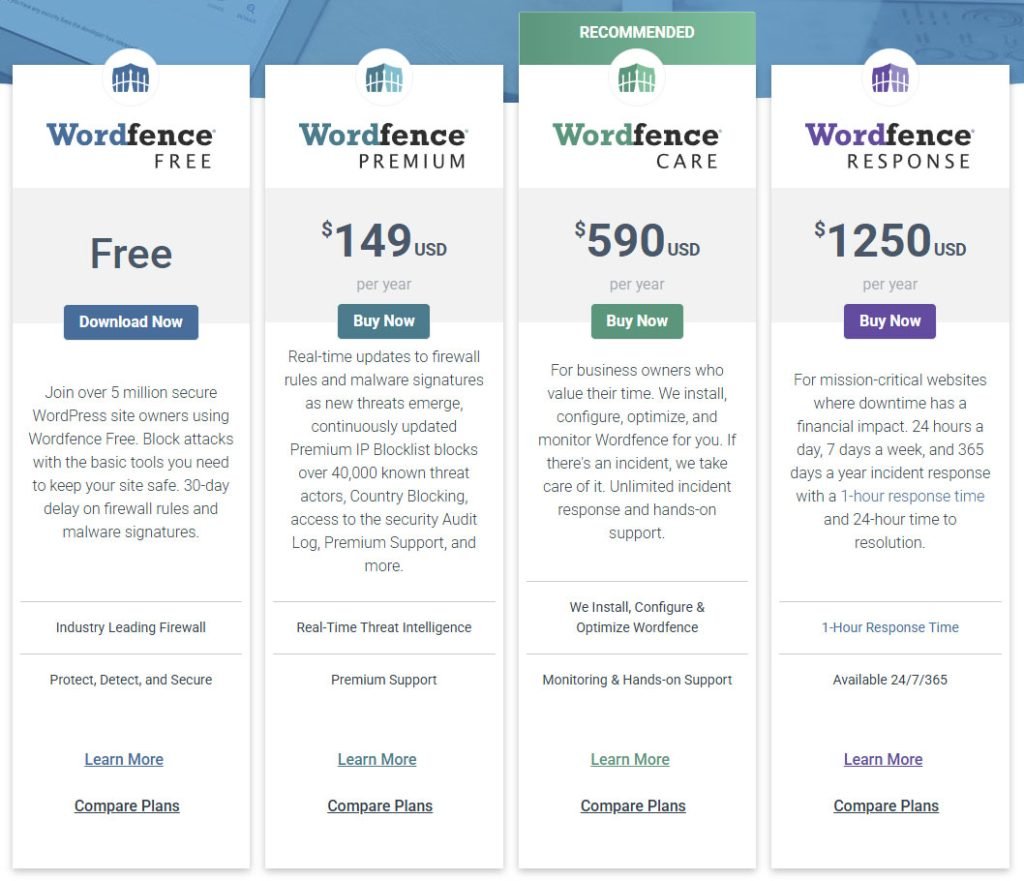
It may seem like a lot, but it is cheaper than paying someone to remove malware from WordPress site after a hack.
Wordfence vs Sucuri
Both Wordfence and Sucuri are top website security services. Here is a quick comparison:
Feature | Wordfence | Sucuri |
Firewall | Yes | Yes |
Malware Scanner | Yes | Yes |
Login Security (2FA) | Yes | No |
Price | Starts from $149 | 229 |
Real-time Monitoring | Yes | Yes |
Firewall based | Cloud-based |
Wordfence vs Sucuri
Wordfence and MalCare are both popular & top WordPress security plugins. Both work well, but in different ways. For example, scanning type, firewall-based, and so on. See the comparison table.
Feature | Wordfence | MalCare |
Malware Scan | Deep file scan | Cloud-based scan |
Firewall | Built-in WAF | Website-level only |
Real-Time Protection | Yes (Premium) | Yes |
Ease of Use | Moderate | Easy |
Price | Lower | Higher |
Wordfence vs All-in-One Security
All In One WP Security is another free plugin. It’s also beginner-friendly. But there are differences:
Feature | Wordfence | All In One WP Security |
Malware Scanner | Yes | No |
Firewall | Yes | Basic |
2FA Login Protection | Yes | Yes |
Live Traffic View | Yes | No |
Wordfence gives more complete protection. It also scans for WordPress security issues and helps with WordPress malware cleanup.
Is Wordfence Worth It?
Let’s answer the big question: Is Wordfence worth it in 2025?
If you allow me to tell in short, the answer is:
Yes, it is.
If you want peace of mind, Wordfence Security gives that. The free version is strong. The premium version is even better.
It helps you:
- Keep your site safe
- Avoid WordPress vulnerability
- Block bad traffic
- Know if your site is under attack
- Detect and remove malware quickly
This plugin is trusted by millions and used by many website owners, even agencies.
Does Wordfence Slow Down Website?
Some users ask: “Does Wordfence slow down the website?“
Here is the truth:
- Yes, a little bit. But not in a big way.
- Because it runs scans and checks traffic, it uses some resources.
- But if your hosting is good, you won’t feel it.
Most people agree that the small speed impact is worth the big security benefits.
My Experience Using Wordfence for 10+ Years
I have been using Wordfence for more than 10 years on different types of WordPress websites. These include:
- Personal blogs
- WooCommerce stores for clients
- Membership websites
- Agency client sites (managed with Wordfence Central)
I also recommend Wordfence to my students at Mentor.com.bd and clients of WPBravo.com.
Why?
Because it works.
It gets regular updates, doesn’t use flashy tricks, and keeps websites safe, even when you’re not looking.
It’s one of the most reliable tools I’ve ever used.
Frequently Asked Questions (FAQs)
Ask me anything related to Wordfence, and I’ll answer as soon as I can!
Below are answers to some of the most common questions that people ask about Wordfence.
These will help you understand if Wordfence is the right security plugin for your WordPress website.
Is Wordfence free good enough?
Yes, the free version of Wordfence is great for beginners. It gives you malware scanning, firewall protection, and login security. For most small websites, it is good enough.
But you run a money-making website, then I strongly recommend that you get the premium version. It will save you years of hard work & reputation from a malware attack.
Is Wordfence a WAF?
Yes. WAF means Web Application Firewall. Wordfence has a built-in firewall that protects your WordPress site from bad traffic and hackers.
How often does Wordfence scan?
In the free version, it scans once a day. In the premium version, you can set scheduled scans as often as you want with real-time protection.
What is error 500 in Wordfence?
A 500 error means something went wrong on the server.
It can happen if your hosting has low memory or conflicts with other plugins. You can fix it by disabling plugins one by one or contacting your host.
Does Wordfence have a cache?
No. Wordfence is not a caching plugin. It focuses only on security. For caching, you can use a plugin like WP Super Cache or LiteSpeed Cache.
What is better than Wordfence?
It depends on your needs.
Sucuri is good for cloud-based protection.
MalCare is simple and also good.
But Wordfence is a top choice for many because it offers strong features together.
Is Wordfence open source?
The plugin is not open source, but it’s free to use under GPL license.
How many websites are on Wordfence?
Wordfence is used on over 4 million websites. That makes it one of the most popular WordPress security plugins in the world.
Is Wordfence free to use?
Yes. You can use the free version without paying. It has strong basic protection. You can upgrade later if needed.
Why am I being blocked by Wordfence?
Wordfence may block you if it thinks you’re a bot or doing something unsafe.
Try clearing your browser cache or using a different device. If you’re the site owner, you can whitelist your IP from the Wordfence dashboard.
Is Wordfence enough?
For most small and medium websites, yes. It gives you firewall protection, scanning, login safety, and more.
But for extra safety, you should also keep backups and use strong passwords.
Can Wordfence remove malware?
Yes. Wordfence can find and remove many types of malware.
The premium version gives faster and more advanced malware detection.
You can also request professional malware removal.
How much does Wordfence cost?
The free version is $0. The premium version starts at $149 per year for one site.
Which is better, Wordfence or MalCare?
Both are good.
Wordfence gives deep security features and a live traffic view. MalCare is more beginner-friendly and works from the cloud.
Choose based on what features you need most.
Does Wordfence scan the database?
Yes. Wordfence scans your database for malicious code, spam, and other threats, especially if you have premium.
Does Wordfence protect from DDoS?
Wordfence can help block some DDoS attempts by limiting bad traffic. But for full DDoS protection, a CDN like Cloudflare is a better choice.
Does Wordfence protect against spam?
Wordfence blocks spam bots and fake logins. But for comment spam, it’s better to use a plugin like Akismet or Antispam Bee.
Final Verdict: Is Wordfence Still Good in 2025?
If you are looking for the best website security plugin for WordPress, Wordfence is a great choice. Whether you’re a blogger, small business owner, or freelancer, Wordfence will help you secure WordPress, scan for malware, and block hackers.
It answers questions like:
- “Is my site hacked?“
- “What is the best tool to scan WordPress site?“
The answer is simple: Try Wordfence Security today.
You can start with the free version and upgrade when needed.
Stay safe and keep your website clean!