Are you confused as to which theme to choose to start a WordPress blog, e-commerce, or business website?
Don’t worry! You are not alone.
There are thousands of themes out there and if you buy the wrong theme it will end up hurting your rankings, and business needs and might even be the reason for a substantial monetary loss.
In this step-by-step article, I will show you how I research to choose a WordPress theme for me or my clients.
How to Choose a WordPress Theme?

I came up with a formulaic approach to picking the right WordPress theme. If you use these two approaches, you will end up with one single theme that can meet your needs.
Follow approach 1 if you want to build a website that needs some special features.
Follow approach 2 if you need a simple website.
Approach # 1
This is the step-by-step journey to find the most suitable WordPress theme. When you have a specific type of website in mind with a range of features, Approach 1 will be the best for you.
I personally follow this approach when I’m building a website from scratch. It takes time, but the end result is worth it.
Follow these 10 steps to know how to choose a WordPress theme? This guide will help you to find the best WordPress theme for your website.
Step 1: Identify Your Needs And The Features
Listing your needs and requirements depends mainly on how much you understand your business or your goals.
Simply take notes of everything you need from your website.
Let’s use this approach for a hypothetical business.
For example, I want to build a website to sell video editing courses and maybe some ebooks as well.
Here are the things I would need in a theme for this type of website:
- A course selling functionality.
- Dashboard where students can sign up and log in.
- Other digital product selling functions.
- Review page
- About Me.
- A home page that talks about my experience.
Now that I have my requirements, let’s move to step 2.
Step 2: Choosing Between Free vs Premium Theme
You have two options when it comes to WordPress themes. Free or premium (paid theme).
Over the last few years, I think the free themes have developed quite a lot.
But these themes work for only limited use cases:
- Personal portfolio website.
- Simple Blog website.
- Company website to showcase services.
- Local eCommerce website.
When you are in a serious business and need a high-performing website, you won’t find most of your requirements in a free theme.
I’ve searched in the WordPress theme repository for a course-selling theme and none of the themes even come close.
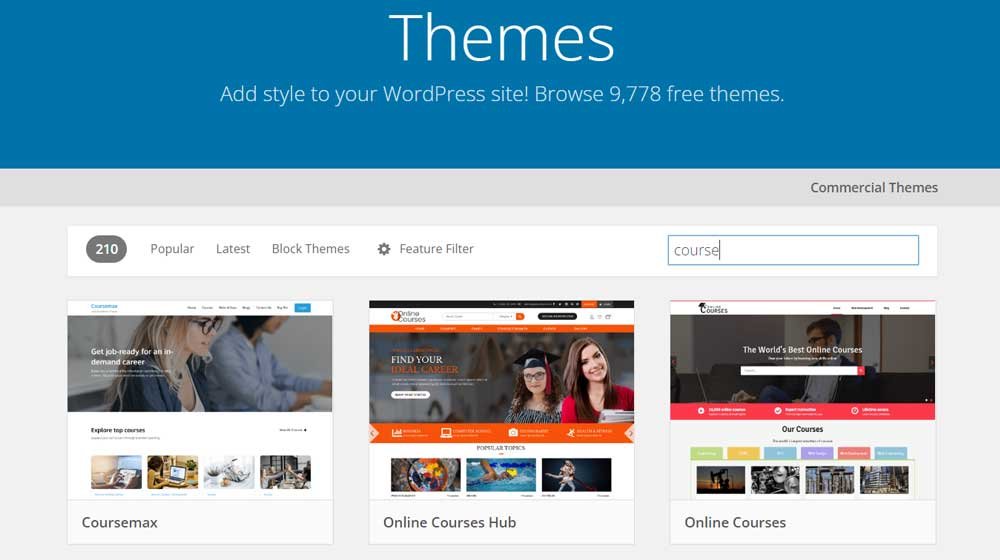
In Step 3, we will check out paid WordPress themes.
You can also use this step-by-step approach to choose a Free WordPress theme if paying up isn’t an option for you now.
Step 3: Surfing Theme Marketplaces For A Match
Now based on the features you have listed, it’s time to choose a premium theme.
So, where to find one?
The most popular marketplaces for WordPress themes are:
Astra is basically not a marketplace. When you go over to their websites, you can find a lot of pre-made templates based on the original theme for different purposes.
For example, if you head over to WordPress Astra theme’s official site and search for ‘course’, you will find these templates.

And more than one definitely fits the requirement of our hypothetical course selling business.
I recommend looking into ThemeForest as it provides more info and data related to the themes like reviews, sales, and other figures.
I went into ThemeForest and just typed in ‘course’ and here are the themes I think best matches our course business:

- University – Education, Event, and Course Theme
- Education Course
- Clever Course
- Leadership – Coach Online Courses
So, along with Astra, we now have 5 options to choose from!
Step 4: Compatibility With Your Favorite Plugins And Tools
Before you go over anything else, it’s important to know whether the theme you are buying supports the plugins you will need in the future.
So, if you are building an e-commerce website, it should support Woocomerce.
If you are building a hotel or dental website, there should be options for booking, or at least, it should support popular booking plugins like Woocommerce Bookings and Bookly.
In the case of our course selling website, our theme should have an in-built learning management system or have the option to connect one without going into too many customizations.
Out of the 5 themes we have chosen, I’m gonna eliminate the number 3 (clever course) theme as it doesn’t have Woocommerce connected to it.
Step 5: Check Design And Responsiveness And Eliminate Others
A lot can be changed design-wise. If you are willing to put in the time, you can customize most themes to perfection.
But it’s still a good idea to check the theme’s design so you’re after work becomes easier.
Check out the layout and the way different sections are presented.
Does the theme look modern and appeal to your target audience?
You might also consider the color.
But that can be changed with little effort.
I eliminated Astra as it lacked a few features and the design was not what I wanted.
So, we are left with only three themes at this point.
Step 6: Keep The Themes That Are SEO Optimized
You can check the theme pages and see if the seller/creator has termed their theme SEO-friendly. Most themes these days are SEO-friendly.
But how can you know which one is the best SEO-friendly WordPress theme?
If you are not experienced in reading HTML 5, you can’t know for sure.
However, you can do a few things:
- You can use the W3C Markup validator to see if the HTML code is properly written.
- You can check if the site displays properly in both Pc and mobile modes.
When you run the demo version of your premium theme, you might find warnings. But that’s not an issue. You will need to see the number of warnings and if there are any errors.
So, after running both these tests, I decided to eliminate the ‘leadership – coach online courses theme’ as it had more than 70 warnings and 9 errors. I think this theme has a lot of complicated and unnecessary codes that can pose SEO problems in the future.
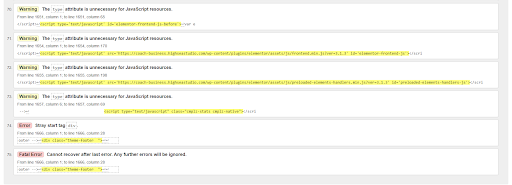
Now, we are left with only two themes to choose from.
Step 7: How Fast Do The Themes Load?
Before actually building your website with a theme, you can’t for sure tell which theme would be the fastest.
Because the themes might have extra features that you can turn off when building the site.
You can still use GTmetrix to see which of your theme loads up fast.
Additionally, GTmetrix will give you other metrics to understand the overall quality of the theme.
Just paste the link of the demo version and hit enter.
Here’s the result of the ‘Education Course’ theme.

And, here’s the result of the ‘University theme’.

Based on these metrics, I would say the ‘University theme’ outperforms the ‘Education course’ theme by some distance.
But both are still slow compared to the standards.
You can make them faster once you start building your website.
So, I can eliminate the ‘Education course’ theme. But I’ll keep both on my list to check out the final two steps.
Step 8: Check Review, Rating & Popularity
At this point, you might come down to choosing between 2 or 3 themes at most. It’s best to take a look at the reviews and popularity of themes you have on your list.
I would definitely choose the theme that has the highest rating. And in most cases, the theme that passes Step 8 will also pass Step 9.
For example, between the two themes, we are left with, the ‘University theme’ has the highest rating and reviews.
It has 4.51 stars out of 5, a total of 290 ratings, and sold around 5700 units.

And, the ‘Education course’ theme has 4.37 stars out of 5, only 35 ratings, and 800+ sales.
But, mind you ‘Education course’ theme has a lower price tag. So, the price factor can also come into play.
Step 9: Support & Updates
If you still can’t decide between your themes, the last factor to consider is support and updates.
The theme maker should offer you support if something weird happens like code errors and crashes.
You can also check out the updated history of the themes and see if the seller is actively providing updates. You will find the update list/release logs at the end of your theme item list in ‘Themeforest’.

Step 10: Reaching The Final Theme
By this step, you should have only 1 theme to work with and no more confusion. You can go ahead and use this theme to build your WordPress website.
In the case of our course selling website, we decide to go with the number 1 theme we mentioned in Step 3 which is the ‘university theme’. It outperformed the ‘Education course’ theme in Step 8.
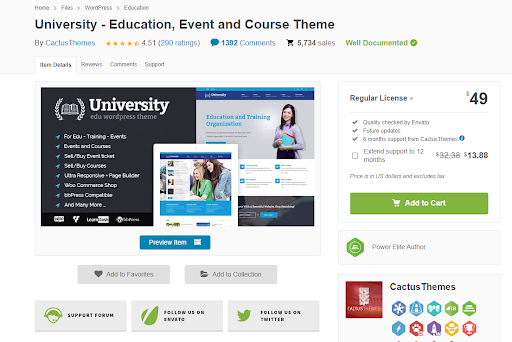
I think this theme will work for our hypothetical course selling business.
Because it can be connected with a learning management system. It has a store function to sell physical and digital products and is comparably a faster loading theme.
Approach # 2
The way to choose the fastest and most lightweight WordPress theme. This is the approach I usually recommend to people who needs a website for only a blog, landing page, or personal portfolio website.
These types of websites don’t need any special features. All they need to do is load faster and engage with the audience.
Here is a list of the most lightweight themes in the market:
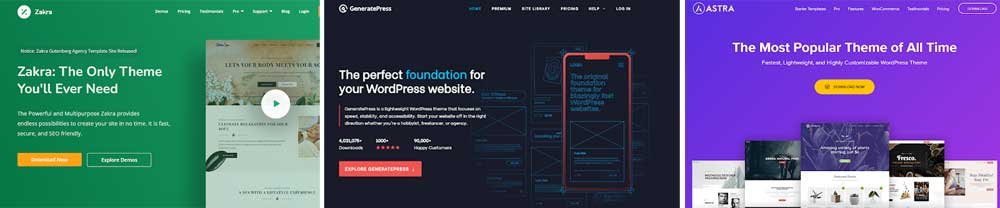
If I go with this approach, I almost always end up choosing Astra as it has the fastest loading speed. Depending on your needs and design, your choice can vary a little.
Still Not Sure?
This is all about how to choose a WordPress theme and how I do that.
If you still have confusion.
I can help you to decide and set up your WordPress theme.
I have built a dedicated team of web designers and developers who can help come up with just the right theme you need for your WordPress website.
We will consult with you and take notes of all your business requirements.
Based on that, we can then recommend you a suitable theme and set it up for you.
If your requirements demand a custom theme or features, we can also help you develop your website from scratch.