
Shopify vs WooCommerce? Which is the best ecommerce platform for online business 2026?
If you are thinking of starting an online store, this is probably what you are stuck with.
Both Shopify and WooCommerce are immensely popular and there are loads of loads of successful examples.
To make it easier, I tested out and analyzed Shopify and WooCommerce using 10 crucial metrics.
Here’s what I found:
Key Findings— Who’s the winner?
- Shopify wins 7 of the 10 metrics we have analyzed. Overall, Shopify should be your go-to choice when it comes to selling products online.
- Use WooCommerce in the following situations: You have a low budget, You need customized features uncommon in regular ecommerce stores, or You have a diverse customer segment and need to connect with different payment providers.
- Things to consider if you choose WooCommerce vs Shopify: You will need to subscribe to a paid plan, You will need to pay 2% transaction fees to Shopify along with other processing fees and Customizations will become limited.
- Shopify is best for users with limited technical knowledge on site speed, coding, e-commerce, and website building. It’s a no-brainer e-commerce builder.
- Choose Shopify if your business model is dropshipping.
Understanding WooCommerce vs Shopify
You might have a question, is WooCommerce better than Shopify? Should I move from WooCommerce to Shopify? Within the next couple of minutes, you will be able to identify the best e-commerce store builder between WooCommerce vs Shopify.
Shopify
Shopify is a self-hosted subscription-based eCommerce builder that focuses primarily on selling products online.
Setting up an online store, managing inventory, and accepting payment— everything takes place within one single platform.
No technical knowledge is required to run a Shopify store!
WooCommerce
WooCommerce is not a standalone e-commerce builder. To build an online store, you need to set it up with WordPress and a hosting provider.
It’s an open-source platform, so you can customize it to meet diverse business needs.
In most cases, you will need to have some level of technical expertise to use it.
10 WooCommerce vs Shopify Metrics Analyzed
1. Pricing Structure and related costs: Woocommerce Winner
“WooCommerce is totally free and you get to choose your own hosting plan”
If you have budget issues and have a small market segment to cater to, WooCommerce is the best option.
Why? It’s a completely free WordPress plugin.
Though you need to buy a hosting plan and domain separately, you get to choose your own service provider.
In my opinion, the cheapest and most useful combination is Bluehost+WooCommerce.
You can get hosting from Bluehost at as low as $4.95 per month. Add a domain that can cost $8-$11 per month which you can get from either Bluehost or NameCheap.
That’s it.
Your total monthly cost will be $13-$16 with WooCommerce.
With Shopify, if you are using a branded domain, it can cost a minimum of $40 per month (includes Shopify basic $29 and domain $11 per month).
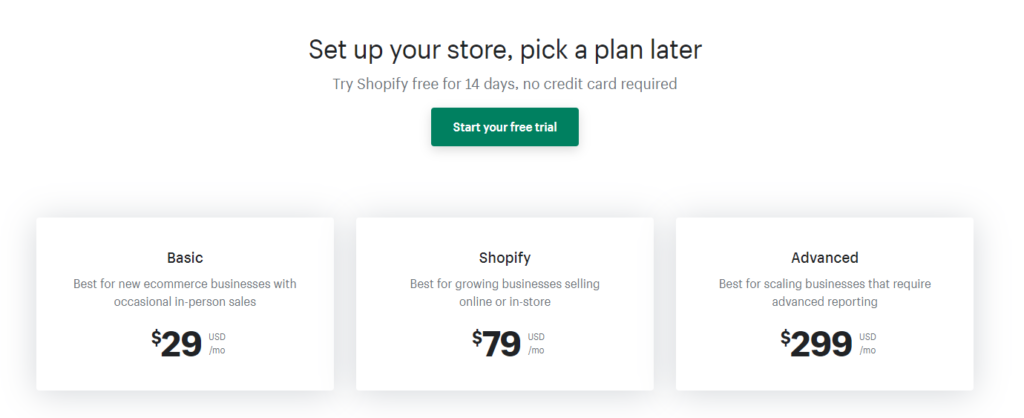
Moreover, you might need to spend more on Shopify plugins along the way. Whereas, you can find a lot of free plugins for WooCommerce.
2. Set up speed: Shopify Winner
“It takes less than 1-2 minutes to get started in Shopify before you start adding products”
Setting up and getting started is blazing fast in Shopify.
All you need to do is sign up and then Shopify will guide you through the entire process.
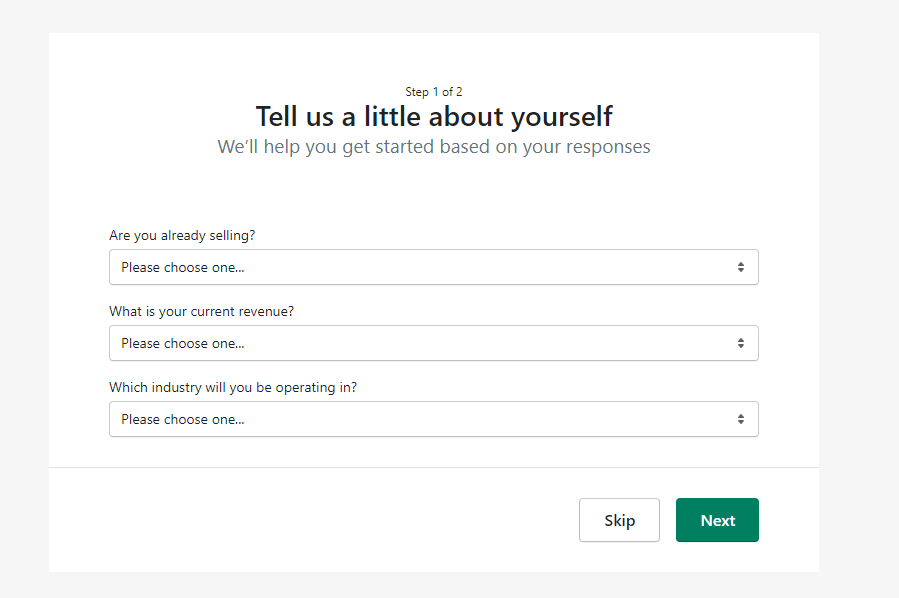
Just fill up step 1 and step 2 and you will be taken to the Setup Guide. This will allow you to add products, choose a theme, connect domain and even design a logo from a single interface.
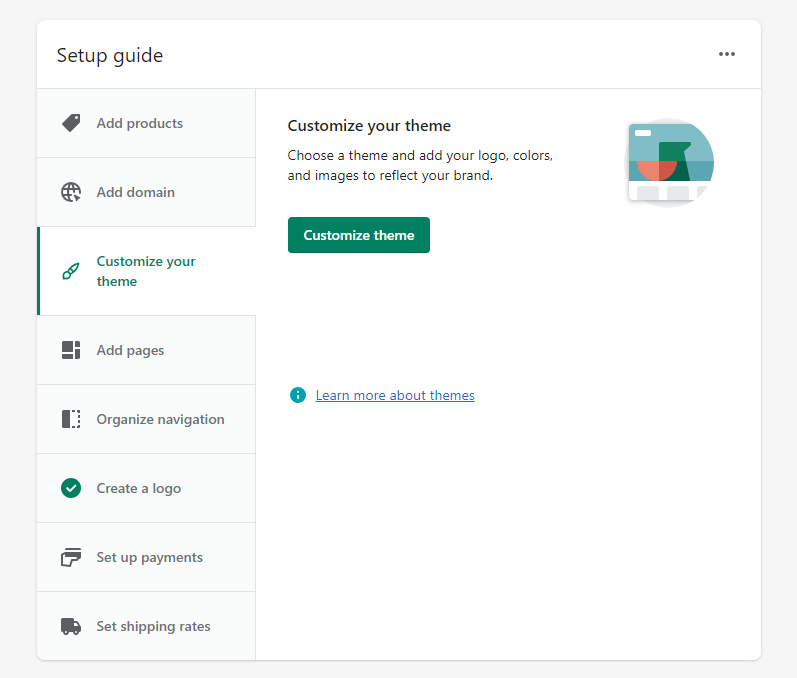
To reach this step, you only need 1-2 minutes at most!
In WooCommerce, you will need to go through these steps below to reach the setup wizard:
- Buy a domain (2-3 min)
- Buy a hosting plan (2-3 min)
- Connect domain to hosting (5-7 mins)
- Setting up WordPress and choosing a theme (5-7 mins)
So, you will need more than 20 mins before you can actually install WooCommerce in WordPress.
3. Usability: Shopify Winner
“Using Shopify is self-explanatory and even a total novice can set up a store in no time”
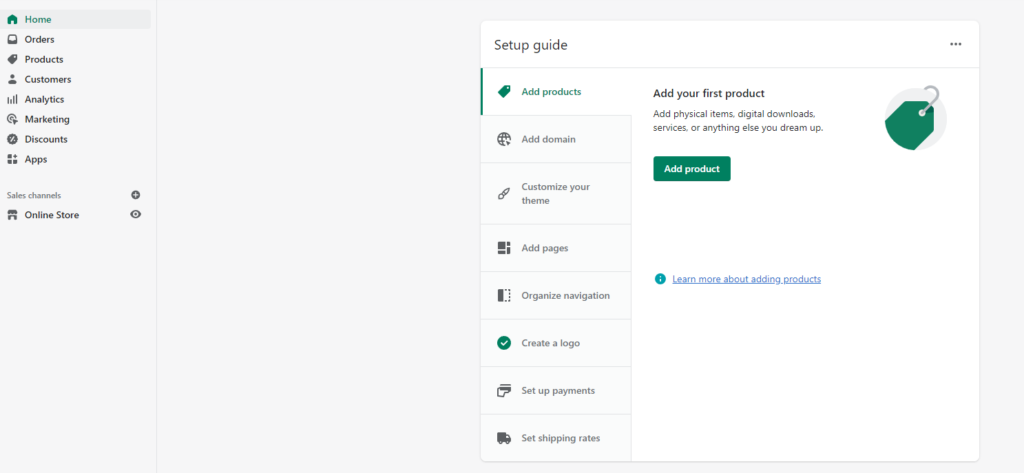
This screenshot of the Shopify dashboard is all there you need to make and run your store. On the left sidebar, you can access your Orders, view products, keep track of analytics and connect new plugins/apps.
The best thing is you don’t need to manage or update any plugins in order to ensure the smooth running of your store. If you have zero prior experience building a website as well as Zero experience in ecommerce, Go for Shopify.
WooCommerce has a lot more functionalities compared to Shopify. You can do a lot more stuff with it. However, maybe that’s what you don’t need now.
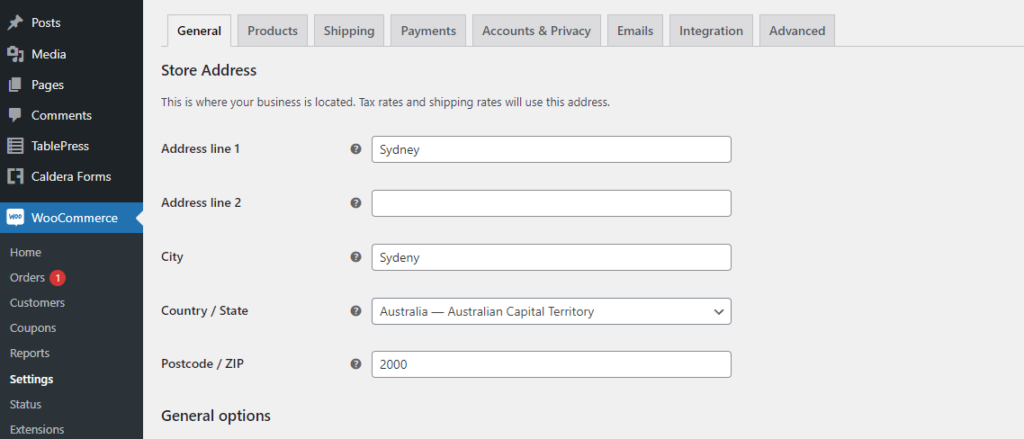
I find the interface of WooCommerce a bit intimidating. Apart from managing your store, you still have to manage your entire WordPress dashboard.
Sometimes and more often than not, plugins will stop working or clash with WooCommerce. With Shopify, that’s never an issue!!
4. Customizations (Add-ons and Themes): WooCommerce Winner
“Nothing can beat the combination of WooCommerce and WordPress when it comes to customization. Best suited for store owners who want more control over their store functions”
In Oct 2021, there were around 55000 plugins in WordPress.
Guess what? In 2026, there are now more than 59000 plugins.
The level of customizations you can do to your WooCommerce store is insane. All you need to have is patience and a few technical skills. Alternatively, you can hire web developers like us to get it done for you!
You can choose from a plethora of themes from WordPress or from third parties like Themeforest. And the starting prices of premium themes are cheaper compared to Shopify.
No matter what your niche is, you can find a theme that will meet your needs.
Shopify has a limited collection of themes and plugins. So, if you are looking to create a store with creative functionalities, WooCommerce might be better suited for you.
What I love about Shopify is the themes it provides are tailor-made for ecommerce. In most cases, you won’t need to customize anything.
5. Payment System: WooCommerce Winner
“WooCommerce has more payment options and charges fewer transaction fees. Perfect for large volume sales globally”
Whenever I make an online store for clients who have a diverse customer base globally, I recommend going with WooCommerce. It supports almost all popular payment service providers and even mobile money.
You can always find a payment plugin inside WordPress that can connect with WooCommerce in no time.

The best way to approach this metric is to ask questions like:
- Will I use third-party payment providers?
- Do I have a large and diverse customer base?
- Is my sales volume large?
If the answers to these questions are ‘yes’, then go for WooCommerce.
WooCommerce doesn’t charge anything extra other than what the third-party providers charge.
Whereas, when you use a third-party provider in Shopify, you need to pay 2% transaction fees on top of what the providers charge. This can quickly add up when you sell in large quantities.
If you still want to stick with Shopify, get the Advanced Shopify Plan (only 0.5% fees).
6. Security: Tie
“With Shopify, you don’t have to worry about security. You can make your WooCommerce pages super secure, but you need to have more technical knowledge”
Most people think that WooCommerce or websites made on WordPress are not secure.
This is not true.
The security of your WooCommerce website will depend on how you know about online security and what kind of plugins/tools you are using.
Security and malware removal plugins like Wordfence and Astra Security can offer protection against high-level attacks. The downside is you need to have technical knowledge in this area or depend on someone who knows their stuff.
With Shopify, things like SSL, PCI compliance, etc. are already taken care of. As Shopify hosts stores in their own server, they manage all the security issues.
For users who hate technical jargon and want to just focus on selling, Shopify is perfect for them.
Other than that, you can get a good amount of security from both platforms.
7. SEO Functionalities: Tie
“WooCommerce has more options to boost SEO using its large library of free extensions. Shopify has a cleaner coding structure that can earn positive points on your search engine rankings”
Shopify vs WooCommerce: Who wins the SEO game?
Both perform well for SEO. I’ve developed hundreds of websites over the years and ranked them to the top of SERP. What I found was SEO is more of a personal thing and the platform you use won’t matter much.
I think with WooCommerce, you can experiment quite a lot with different SEO tactics and see what works out. Plugins like SEOPress, Yoast SEO, and Rank Math can really boost your SEO game.
But in the end, if you still don’t have any knowledge of SEO, you will struggle.
Shopify does have a few apps for SEO like AVADA SEO Suite and SEO Expert Pro, you are limited to what their app store offers.

I would give Shopify an edge considering the fact it has a cleaner coding structure and less hassle to deal with SEO and all other stuff.
8. Loading speed: Shopify Winner
“Shopify product pages load way faster than WooCommerce product pages. With WooCommerce you will have to depend more on hosting plan and other factors”
I’ve worked with a lot of e-commerce stores over the years. Before going into stats and data, I can say that Shopify is way faster than WooCommerce.
Yes, you can play around with WooCommerce to increase its speed to an optimal level. However, it will unlikely ever reach the speed of Shopify.
The reason is simple.
WooCommerce runs on WordPress and to make it functional, you will need to install different kinds of plugins that can slow down your website.
A lot will depend on the speed and quality of your hosting. If you are on a budget shared hosting plan, no matter how much you tweak with coding and plugins, your site will always remain slow.
Shopify will handle everything from hosting and speed. So, you will always have faster-loading web pages.
Let’s give you some stats.
eCommerce conversation rate is the highest when web pages load within 0-2 seconds.
Quanta.io conducted a research study and found that it takes 0.79s to load product pages in WooCommerce. Whereas, it only takes 0.22s to load product pages in Shopify.
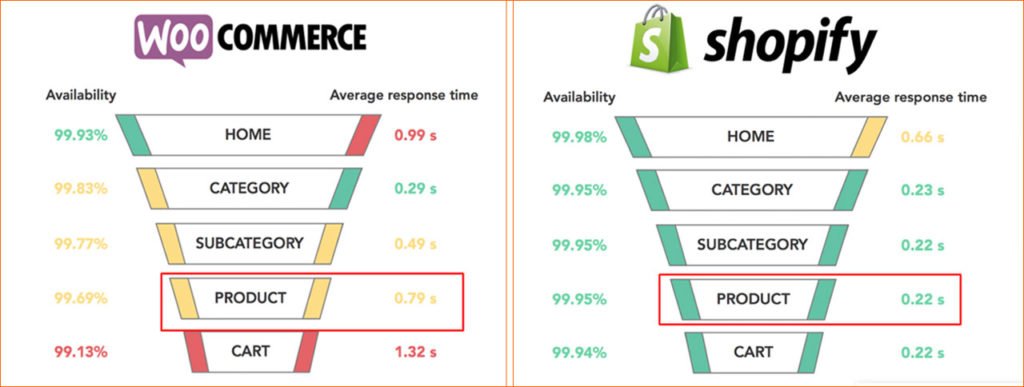
Source: Quanta
Although 0.79s is still good enough, you are likely to get more conversion when your pages load in 0.22 s.
Shopify is the faster-loading webpage!
9. Customer Support: Shopify Winner
“Choose Shopify if you need unified and complete customer support”
Support is an important factor when you use Shopify or WooCommerce to sell products online. Because a downtime or slow web page can result in lost sales and that customer might never return again.
I got the best support from Shopify. They have 24/7 customer support and you can reach them out via mail, chat, phone, and even Twitter.
As Shopify manages everything from hosting to store, you will get more unified support and fix issues faster.
WooCommerce does offer 24/7 support if you get their premium plan. But considering, you are using a separate hosting and a range of different plugins, WooCommerce support won’t help much.
10. Dropshipping: Shopify Winner
“Shopify offers more value when it comes to dropshipping and the process of adopting it as fast and smooth”
Dropshipping is best supported by Shopify when compared to WooCommerce.
If you want to sell products from third parties without maintaining any inventory, the dropshipping model will be highly profitable.
What Shopify offers is native support for a lot of platforms like Amazon and Rakuten. They also have partnerships with leading shipping companies like DHL and others.
Just install Oberlo and start selling right away with no prior experience whatsoever.
What I can tell is dropshipping with Shopify involves a lot less hassle.
You can use WooCommerce for dropshipping. But keep in mind WooCommerce is a general-purpose ecommerce platform and so you need to tweak things to make it work the way you want.
Need Help Setting Up Your WooCommerce Or Shopify Store?
Now that you have come to a conclusion between WooCommerce vs Shopify, it’s time to start building an online store!
Our team can help you to build and customized ecommerce or dropshipping websites in WooCommerce that can outrank your competitors.
Though Shopify is easy to work with, you might not have time to work on your business. We can help to set it up from start to finish.