Did you know?
Almost 50% of hacked WordPress websites were attacked through a file called xmlrpc.php.
Now you might be thinking:
- What is xmlrpc.php?
- Should I disable it on my WordPress site?
In this article, I will I’ll explain everything in simple words. So, if you’re very new to WordPress, you can decide what’s best for your website.
If you don’t use the XML-RPC file, disabling it can be a simple but powerful way to improve your WordPress security.
I will show you how to disable xmlrpc.php in WordPress in a safe and secure manner.
Let’s dive in.
What is XML-RPC in WordPress?
XML-RPC is an old technology in WordPress.
The full form of XML-RPC is XML Remote Procedure Call.
XML-RPC enables your WordPress website to communicate with other apps or tools.
Think of it like a remote control. It helps you do things on your website from elsewhere, such as publishing a blog post from your phone or using apps like Jetpack.
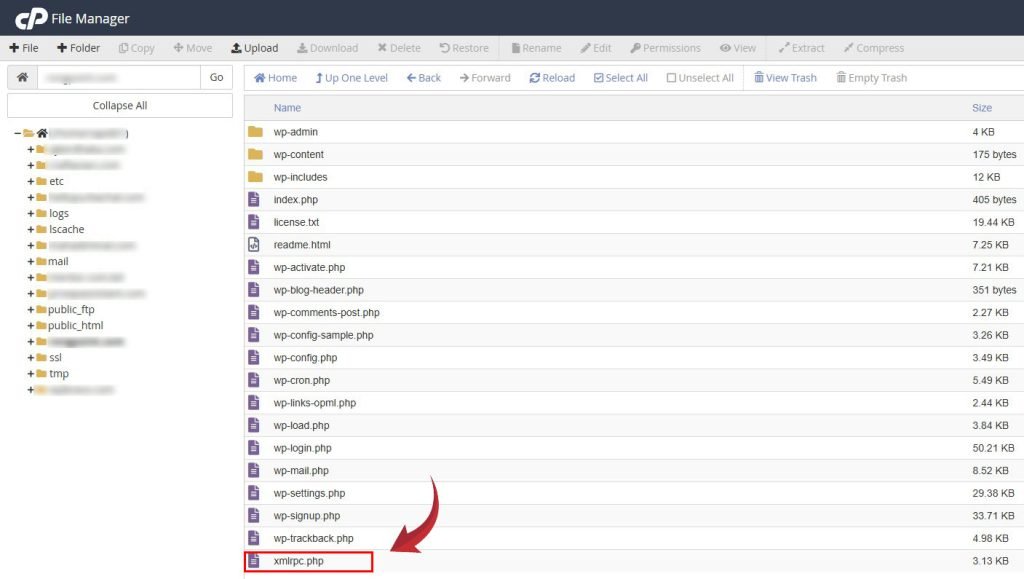
The file behind this feature is called, xmlrpc.php.
You will find this file with WordPress in your root directory.
Let’s compare with a story.
In the past, kings had secret doors in their palaces.
Why?
So they could escape during an attack without having to go through the main gate.
xmlrpc.php is kind of like that.
It’s a secret door into your WordPress website.
Besides the login page, this file allows apps and tools to access your site.
Do I need XML-RPC?
For most websites today, it is no longer necessary.
Modern tools now utilize the WordPress REST API, which is safer and faster.
Unless you’re using an app that relies on XML-RPC (such as Jetpack or the old WordPress mobile app), it’s usually safe and smart to disable it.
Why Should You Disable XML-RPC in WordPress?
Here’s why I recommend turning it off on most sites
Protect from Brute Force Attacks
Hackers can try thousands of password combinations through XML-RPC. This is known as a brute force attack. This is how hacker can take access of your website. He can infect malware and it can slow down or even crash your website. Disabling WordPress xmlrpc can save your site from brute force attacks.
DDoS via Pingbacks
Hackers use the pingback feature in xmlrpc.php to send a flood of fake traffic to your site. This can take your site offline.
It’s Just Not Needed Anymore
If you’re not using remote apps, it’s better to disable XML-RPC. Along with this, there are few things to consider. We have a detailed case study on how to clean & secure a WordPress website. Go and check it.
How to Check if XML-RPC is Enabled
Before you disable it, let’s check if it’s turned on.
To check XML-RPC
Go to your browser.
Then type: https://www.yourwebsite.com/xmlrpc.php. Replace [yourwebsite] with your website domain, then just xmlrpc.php after your domain.
Then Press Enter.
If you see something like:
“XML-RPC server accepts POST requests only.”
Then it’s enabled.
How to Disable XML-RPC in WordPress (3 Easy Methods)
Here are 3 beginner-friendly ways to turn it off.
Method 1: Use a Security Plugin (Recommended for Beginners)
The easiest way is to use a plugin like Wordfence or Disable XML-RPC. If you are using a security plugin like Wordfence, then you don’t need to install another plugin.
Let’s see how you can disable xmlrpc.php file using Wordfence.
After installing and activating Wordfence Security
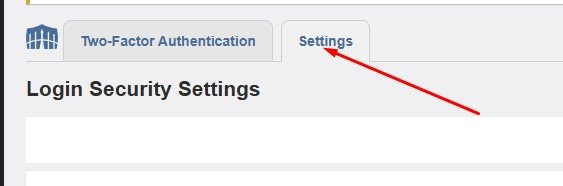
Go to Wordfence → Login Security
Then click the settings TAB
Then scroll down.
Find & check Disable XML-RPC authentication.
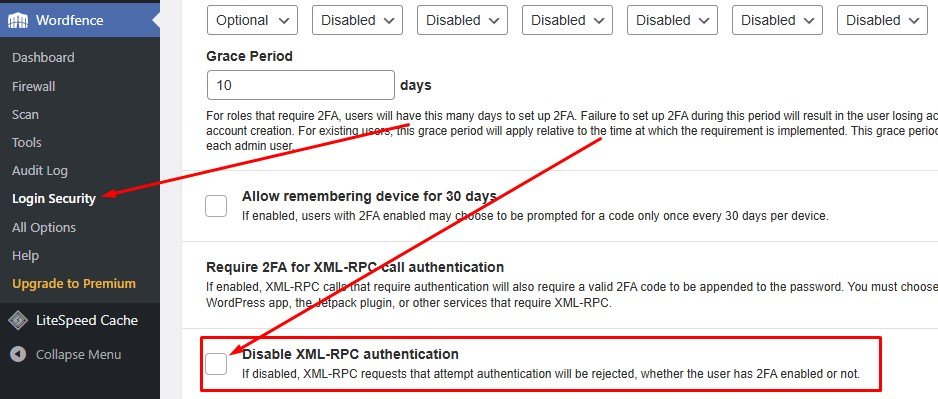
Note: Wordfence doesn’t entirely block the xmlrpc.php file, but it protects the login part, which is the main target.
Method 2: Use a Simple Plugin – “Disable XML-RPC”
If you want to block access to xmlrpc.php completely, this is the simplest way.
- Go to Plugins → Add New
- Search for Disable XML-RPC
- then Install and activate it
- That’s it! Nothing else to configure.
Method 3: Manually Block xmlrpc.php via .htaccess
If you’re comfortable editing files, you can block it with a few lines in your .htaccess file (this only works if you’re using the Apache server).
Steps:
Go to your hosting control panel. You can do that by going through cPanel or using FTP.
Find the .htaccess file in your WordPress root folder.
Add this code at the bottom:
<Files "xmlrpc.php">
    Require all denied
</Files>
Then save.
Now xmlrpc.php is blocked for everyone.
Be careful when editing .htaccess. A wrong step can break your site. If you are unsure, please ask your developer or hosting provider.
Does Disabling XML-RPC Break Anything?
If you’re not using Jetpack, the WordPress mobile app, or other apps that need remote access, then no, it won’t break anything.
Your site will run just fine and be safer.
After disabling the xmlrpc.php file, check again to ensure it is disabled. It’s always in the same place.
https://yourdomain.com/xmlrpc.phpJust replace yourdomain.com with your actual site URL.
Final Thoughts
Disabling XML-RPC in WordPress is one of the quickest and easiest ways to improve your site’s security.
If you’re like most WordPress users and don’t need remote publishing, you’re better off turning it off.
As a WordPress expert, I’ve helped many clients recover from XML-RPC attacks. I hope this article will also be helpful to you. If you have any questions or suggestions, feel free to comment.
You may already have questions in mind. Here, I answer the most common questions about the xmlrpc.php file.
FAQs about WordPress XML-RPC
1. What is xmlrpc.php in WordPress?
It’s a file that helps your site connect to apps like Jetpack or the WordPress mobile app.
2. Can I delete xmlrpc.php?
No. You shouldn’t delete it. If you delete it, it will come with the next WordPress update. Simply disable or block it using a plugin or .htaccess file.
3. Does Wordfence use xmlrpc.php?
No, Wordfence doesn’t depend on xmlrpc.php, but it does protect it by blocking login attempts through it.
4. How do I block access to xmlrpc.php?
Use the .htaccess method or a plugin like “Disable XML-RPC.”
5. What happens if I disable xmlrpc.php?
Your site will stay safe. However, some apps, such as Jetpack or remote posting, may stop working.
6. How do I know if xmlrpc.php is under attack?
If your site is slow or you’re seeing strange activity in your logs, XML-RPC might be under attack.
7. Does disabling XML-RPC affect SEO?
Not at all. It has nothing to do with search engines.
8. I use the mobile app — should I keep XML-RPC?
Yes. If you rely on the WordPress mobile app, you need XML-RPC enabled.
9. Can I disable only parts of xmlrpc.php?
Yes, plugins like Wordfence allow you to block login attacks while still keeping XML-RPC partially available.
10. Is REST API better than XML-RPC?
Yes. REST API is newer, safer, and faster. Most modern plugins use it.